
Find your secret key
Open your account's security settings and choose an authenticator app. Copy the text setup key shown beside the QR code.
Generate time-based one-time passwords (TOTP) from your setup key. Free, fast and calculated in your browser.
Generated in your browser.
Your keys are not sent to our servers.
Your code will appear here
Paste your key to start the countdown.
No account. No app. Just your code.
Your live codes will appear here.
One key. One code. All in one place.
Only labels and codes are copied. Never your keys.
Works with standard TOTP setup keys: Base32, HEX, Base64 and authenticator links. Match your service’s algorithm, code length and refresh period.
Three simple steps. A visual example if you need it.
Open your account's security settings and choose an authenticator app. Copy the text setup key shown beside the QR code.
Add an optional account name, then paste the key above. Your code appears automatically. Leave Remember on this device on to keep the key for your next visit.
Select Copy code and enter it in the service asking for your 2FA code. Use it before the countdown ends.
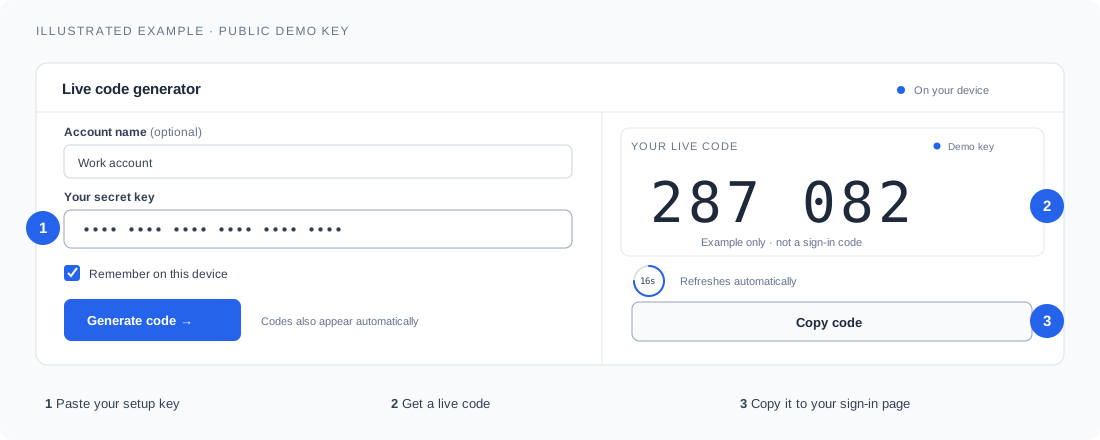
A small tip that makes a big difference. Keep your device's date and time set automatically. TOTP codes depend on the correct time.
Try it nowUse standard time-based authenticator (TOTP) setup keys in Base32, HEX or Base64, or an otpauth://totp link. Formatting spaces, lowercase Base32 and Base64URL are supported. The tool supports SHA-1, SHA-256 and SHA-512, 6–8 digits, and refresh periods from 15–120 seconds. SMS and email codes, passkeys, push approvals, HOTP counter keys and encrypted or migration exports use other methods; use the service’s original TOTP setup key.
It is the reusable setup key your service provides when you enable an authenticator app. It usually contains letters A–Z and numbers 2–7. It is different from your account password, a one-time code or a recovery code. Keep it private: anyone with the key can generate your codes.
Code generation happens in your browser. With Remember on this device enabled, valid keys are automatically saved in this browser and restored on your next visit. They are not sent to our servers. Turn remembering off or use Forget saved keys to remove them. Use remembering only on a browser you trust.
There is no automatic expiry for remembered keys. They can stay available for 70 days and longer, as long as you return using the same browser profile and website address and the browser retains its site data. Clearing browser data, private browsing or browser cleanup can remove them. Saved keys do not sync to other devices or domains.
First, enable automatic date and time on your device. Copy the full setup key for the correct account and use a fresh code before it expires. Most services use SHA-1, 6 digits and 30 seconds; check the service's settings if yours differ. A wrong key or an account that has reset 2FA will need the correct setup key.
It works with accounts using standard time-based one-time passwords (TOTP). The key and settings must match the service. It does not generate SMS codes, approve push notifications, replace passkeys or bypass account security. 2famh is independent of the platforms named here.
After this page has fully loaded, code generation can continue without a connection while the page stays open. An accurate device clock is still required. Reopening or reloading the website needs an internet connection.
No. This tool requires an existing setup key. Use your service's official recovery process or a saved recovery code if you have lost access. Store your setup keys and recovery codes securely, such as in an encrypted password manager.